Stop wrestling with
release notes.
Ship faster.
Writing, formatting, translating, and uploading Android release notes to Google Play Console is tedious. App Store Manager takes over — so your team stays focused on building the app.
- Correct XML format generated automatically
- One-click translation into all Play Store locales
- Direct upload to Google Play Console
- Included in every App Store Manager subscription
5-day free trial · Cancel any time
Everything you need for Android release notes
From first draft to live on Google Play — the complete workflow, automated.

Edit
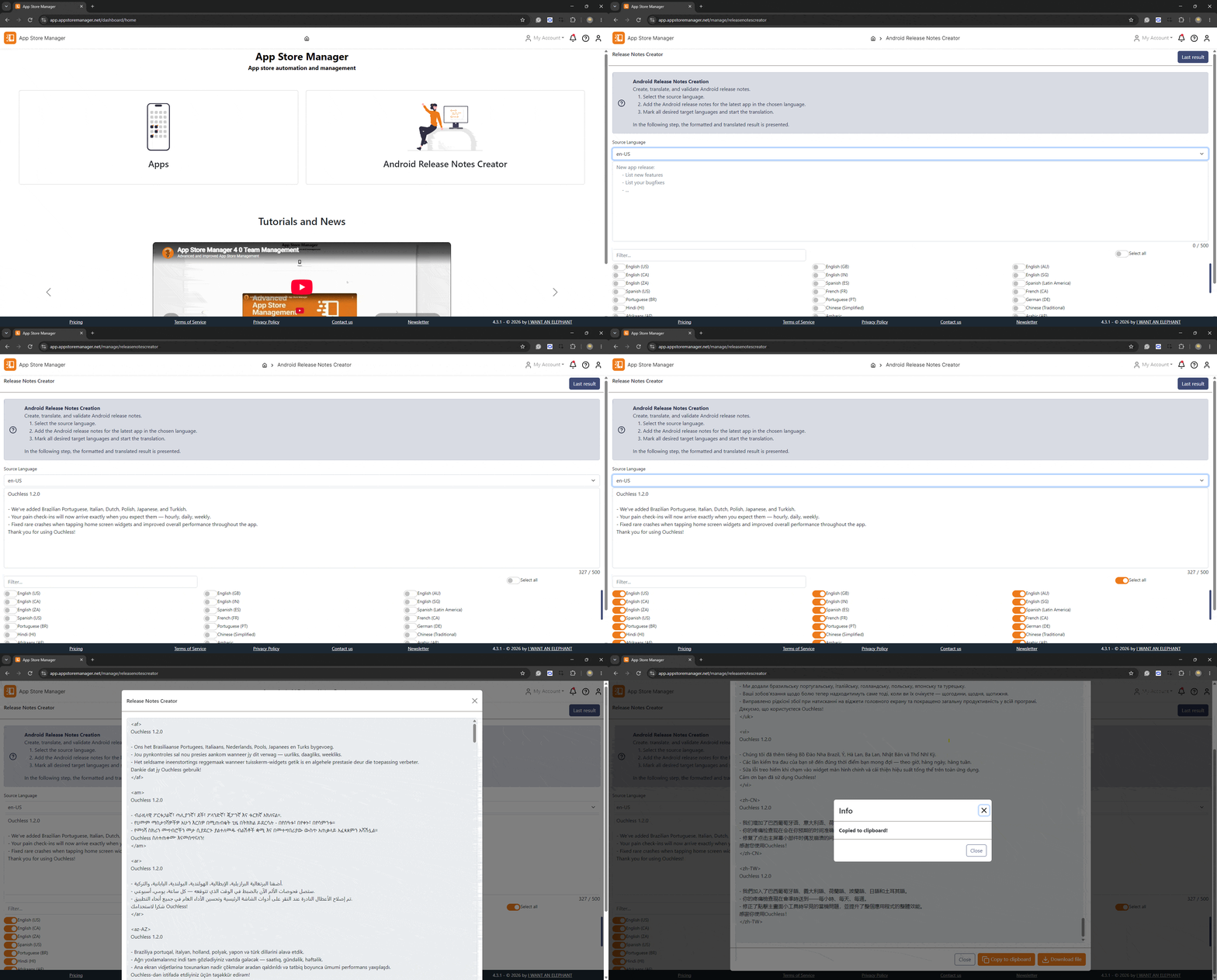
Write your "What's New" text in a clean editor. No XML, no file juggling — just write what changed.

Translate
Reach users in their language. One click translates your release notes into every locale your app supports.

Format
Google Play requires a specific XML-like structure per locale. We generate it correctly, every time.

Upload
Push your release notes directly to Google Play Console via the App Store Manager bulk-upload pipeline.

Import
Already have release notes files? Import existing content and manage everything in one place.

Export
Export to file or clipboard in the correct format for manual use or version-controlled delivery pipelines.
See it in action
Watch how a complete release notes cycle takes minutes instead of hours.
Write once
Enter your "What's New" text in plain language — no formatting or locale handling required from your side.
Translate automatically
App Store Manager translates the text into all active locales using DeepL / Microsoft Translator — review and adjust if needed.
Format & validate
The correct XML output structure for each locale is generated and validated automatically — no manual file editing.
Upload to Google Play
One click sends your release notes to Google Play Console via the metadata bulk-upload pipeline. Done.
More than just release notes
The Android Release Notes Creator is built into App Store Manager — the all-in-one platform for app store metadata, screenshots, translations, and store listings for both Google Play and App Store Connect.
Manage metadata, screenshots, and release notes for both platforms in one workspace.
Invite colleagues, set granular permissions, and collaborate across multiple apps.
Push metadata, screenshots, and release notes to Google Play in a single operation.
5-day free trial
Why teams switch to App Store Manager
Built for app developers, publishers, and ASO managers who release frequently.
Save hours per release
Formatting, translating, and uploading release notes manually can take an hour per release. With App Store Manager it takes minutes.
Reduce agency costs
Many store activities are handled by expensive specialists. App Store Manager levels the playing field for teams of all sizes.
Better ASO through consistency
Frequent, localised release notes signal active development to Google Play algorithms and keep users engaged with every update.
Android Release Notes in every plan
Release notes creation and upload is included in all App Store Manager subscriptions.
For individuals and small teams getting started with store management.
Get startedFor growing teams managing multiple apps across platforms.
Get startedFor agencies and publishers managing many apps with advanced translation needs.
Get startedAll prices excl. VAT · Yearly billing saves up to 10%
Any questions?
We typically reply within one business day — in English and German.